For decades, the construction industry relied heavily on 2D drawings and CAD software like AutoCAD. While this worked for a time, projects gradually became more complex, involving more stakeholders and requiring greater accuracy.
Traditional methods began to show serious limitations: design errors, fragmented information, wasted time, and increased costs.
This is where BIM (Building Information Modeling) emerged—a true revolution in architecture, engineering, and construction (AEC). Today, many countries mandate BIM adoption for public projects, making it the new global standard.
For anyone learning Archicad, understanding BIM is not only essential for using the software effectively but also opens up huge career opportunities in the near future.
What is BIM? A Clear Definition
BIM stands for Building Information Modeling. Contrary to the common misconception, BIM is not just about creating 3D models.
In reality, BIM is a modern digital process in construction, built around intelligent 3D models that contain comprehensive information about a building. It allows project data to be managed throughout the entire lifecycle—from design and construction to operation and even demolition.
A BIM model holds information across all disciplines—architecture, structure, and MEP. Each component (wall, door, beam, pipe, elevator…) is not only represented in 3D but also stores smart data such as material properties, cost, thermal performance, and technical specifications.
All stakeholders—architects, engineers, contractors—work collaboratively on a single BIM dataset, eliminating conflicts and data silos.

Diagram of a building lifecycle within a single BIM model
How BIM Improves Design Efficiency
The rise of BIM, coupled with technological advancements, has significantly transformed how buildings and infrastructure are designed, built, and managed.
BIM enhances efficiency at every stage:
Improved collaboration: Everyone works from the same model, updated in real time.
Cost and time savings: Estimates and scheduling become far more accurate.
Conflict detection: Structural, architectural, and MEP clashes can be identified early.
Lifecycle management: BIM supports everything from concept design to facility maintenance.
In contrast, traditional 2D CAD workflows are now outdated. Any small change requires manual updates across all drawings, often leading to inconsistencies, wasted effort, and higher risks.
BIM solves these issues by ensuring consistency, automation, and seamless coordination—a true game-changer for the construction industry.
Advantages and Disadvantages of BIM
Advantages
Centralized data management: All project information updates automatically across the model.
Visual clarity: Highly detailed 3D models make it easy to explore every component of a building.
Cost & time savings: Accurate estimates minimize unexpected expenses and delays.
Stronger collaboration: Teams work more effectively using a unified model.
Risk reduction: Early clash detection reduces costly on-site errors.
Disadvantages
High initial investment: Software licensing, staff training, and hardware upgrades can be expensive.
Preparation required: BIM workflows demand well-coordinated planning to deliver full benefits.
Sự phát triển của BIM hiện nay
The Evolution of BIM: From 3D to 7D and Beyond
BIM is commonly associated with 3D, but over time new “dimensions” have been introduced:
3D BIM: The foundation—intelligent 3D models.
4D BIM: Adds the time dimension (construction scheduling).
5D BIM: Incorporates cost estimation and financial planning.
6D BIM: Focuses on sustainability and energy performance.
7D BIM: Provides asset and facility management data for maintenance and operations.
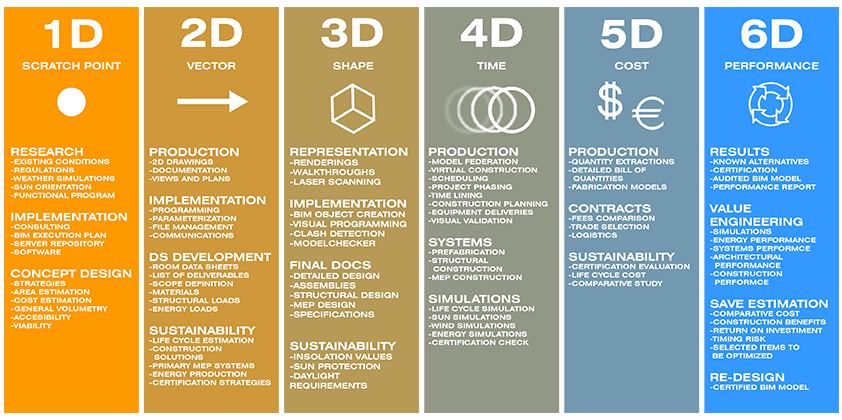
With rapid advances in technology, BIM is moving towards even more dimensions, integrated with AI, IoT, and Digital Twin solutions. Globally, advanced firms have already begun applying 6D and 7D BIM, though building a strong foundation in 3D remains essential.
BIM is no longer unfamiliar. However, adoption still faces challenges such as high initial investment, reliance on unlicensed software, and lack of standardized workflows.
BIM and Archicad
When discussing BIM, Archicad by Graphisoft must be mentioned. Released in 1982, it is considered the world’s first BIM software.
Archicad stands out for its ease of use, making it ideal for students, independent architects, and small teams. Despite its simplicity, it fully supports BIM workflows in:
Architectural design
Structural design
MEP design

With every new version, Archicad introduces features that strengthen data management and streamline design processes, helping users embrace BIM more effectively.
BIM represents a major turning point in the construction industry. By enhancing collaboration, reducing costs, and minimizing errors, it has redefined how we design, build, and operate buildings.
With powerful tools like Archicad, BIM becomes more accessible than ever—for both individuals and enterprises.
If you are an architecture student, engineer, or contractor, mastering BIM and learning Archicad today will give you a competitive edge for the future.