01If you want to use Archicad legally for free, students and learners can apply for a Student License directly on Graphisoft’s official website. This license is valid for 12 months and can be renewed when it expires.
Below is a step-by-step guide to help you get your Serial Number and activate Archicad in the fastest and easiest way.
>> Haven’t installed Archicad yet?
Read: How to Download and Install Archicad (Latest 2025 Version)
Step 1: Open the Graphisoft Education Page
- Go to: https://graphisoft.com
On the top menu, click Support → Education
→ This is the official page for students and self-learners.

Step 2: Click “Get a Free License”
On the Education page, click on “Get a Free License”.
If you already registered before → your Serial Number will be displayed directly on the page.
If you don’t have a serial number yet → click “Apply 1-year Free License”.
Within a few minutes, Graphisoft will send the Serial Number (activation code) to the email address you used to register.
* Tip: Don’t forget to check your Spam / Promotions folder.

Step 3: Activate the Serial Number in Archicad
Once you receive the code:
Launch Archicad
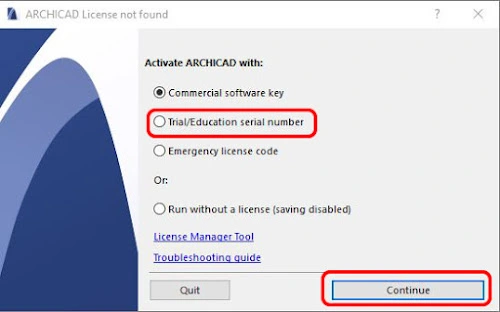
You will see a message saying “No license found”
Select “Trial / Education serial number” → Continue

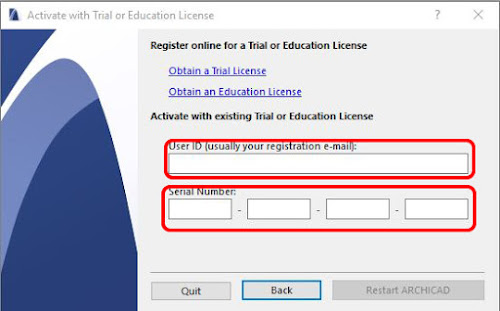
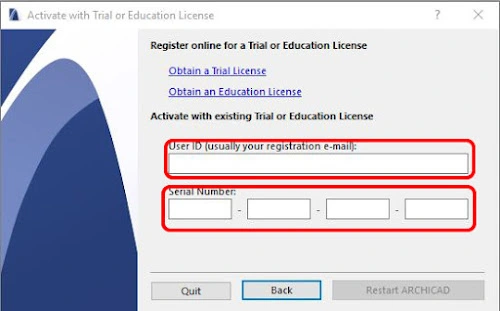
In the Activate dialog:
User ID: The email you used to register on Graphisoft
Serial Number: The code you received in your email

Click Restart Archicad
Once Archicad restarts, it will run in Educational License mode, which gives you full access to the software for 12 months (free of charge).
💡 Notes
When the license expires, simply log back into the Graphisoft Education page and click “Renew License” to extend it for another year.
The Educational Version of Archicad contains almost all features of the commercial version — only a watermark is added to exported drawings.
With just a few simple steps, you can easily get a 1-year free Archicad license from Graphisoft and start learning Archicad right away.